Data Quality Slider: Setup
Last updated: January 17, 2025
With Warmly's Data Quality Slider, you can customize your data preferences to align with your unique needs. Choose to prioritize higher-quality data for more precise insights or opt for greater data quantity to capture a broader range of prospects. This flexibility ensures your data strategy supports your goals, whether they're focused on accuracy or scale.
NOTE: Data Quality Slider allows you to filter data quality globally throughout your entire Warmly account.
Want to choose which quality level flows through different channels of Warmly? Check out our Data Quality Segment
Navigation & Setup
To use the Data Quality Slider, go to the Settings within your Warmly account. Navigate to the Warmly Data Quality tab.
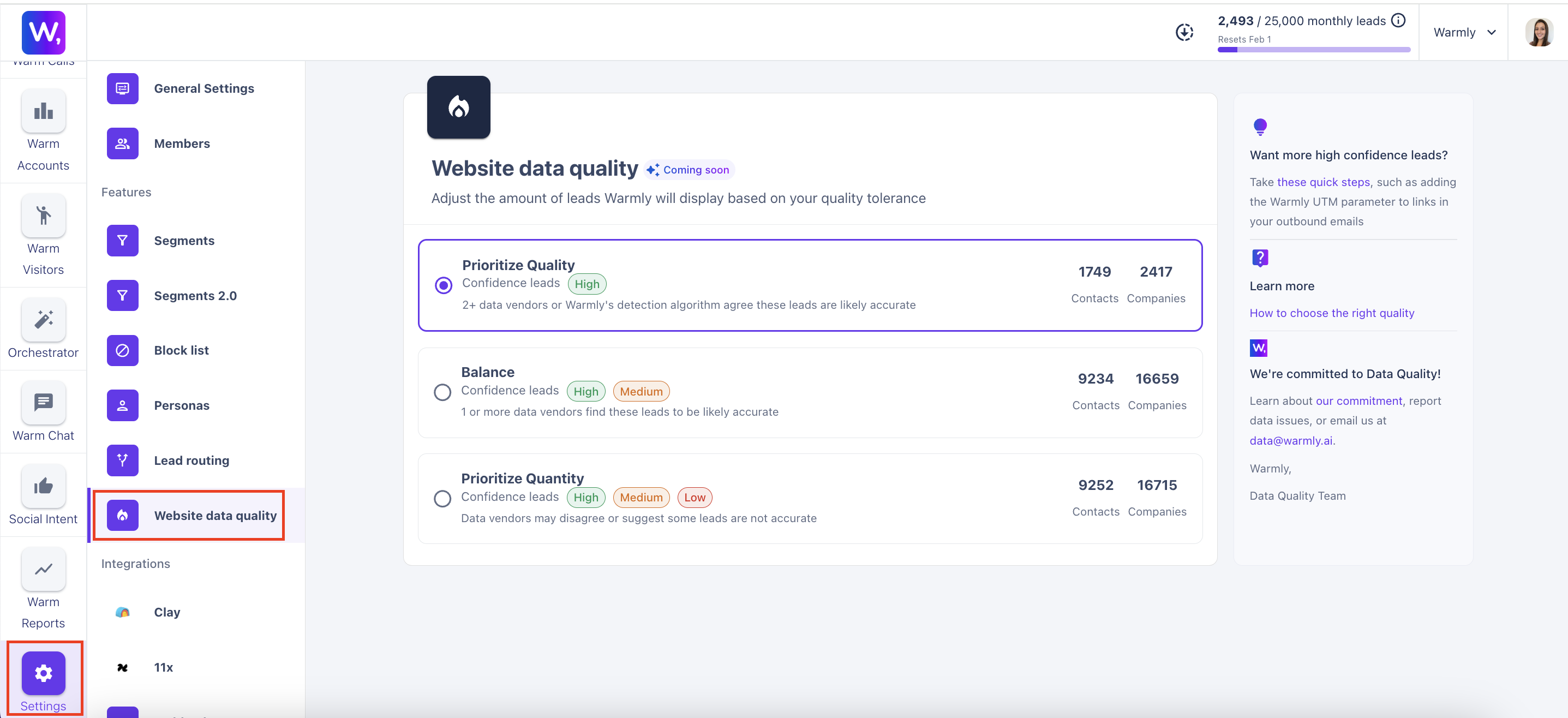
Here you can select if you'd like to Prioritize Higher Quality Data or Prioritize Higher Quantity Data.
Prioritize Quality: 2+ data vendors or Warmly's detection algorithm agree these leads are likely accurate
Balance: 1 or more data vendors find these leads to be likely accurate
Prioritize Quantity: Data vendors may disagree or suggest some leads are not accurate
Quality or Quantity? What Does Warmly Suggest?
This depends on your goals!
Here are a few things to consider when deciding between quality vs quantity:
Smaller companies might go for quantity to maximize outreach
Larger enterprises might lean toward quality for precision
High-value sales pipelines = quality
Broad lead gen campaigns = quantity
How Warmly Determines Quality
Company Data
High Confidence | 2+ providers agree on the domain (plus have med-high confidence) OR 1 provider determines domain is high confidence |
Medium Confidence | 1 provider determines domain is medium confidence |
Low Confidence | 1 provider determines domain is low confidence |
Contact Data
High Confidence | Email click throughs (w_email UTM) Form Fill (website or chatbot) Hubspot cookie Warmly logged-in user Contact database determines high confidence |
Medium Confidence | Contact database determines medium confidence |
Low Confidence | Contact database determines low confidence |
Can I Segment by Data Quality?
You bet! Check out our Data Quality Segment
Note: Creating and applying a Data Quality Segment is not a global change throughout your entire Warmly account. The Data Quality Slider is a global setting throughout your account.
What Data is Affected by The Data Quality Scale?
Warm Accounts & Warm Visitors tabs
Orchestrator
Contact and company level data
Chat
If data is low quality, then the Chat will not fire if the session doesn’t match segment because of low quality
Slack
Warmly will not send a Slack notification if the company/contact doesn't meet matching segment because of low quality
This article was written by the Customer Success team at Warmly. Please feel free to reach out to your CSM directly or [email protected]