Syncing Chats to Salesforce
Last updated: November 8, 2024
Syncing Chats to Salesforce
Warmly enables your team to sync chats to your Salesforce instance. These toggles are available within Warmly's Chat tab (Settings & Brand).
With the first toggle, 'Sync chat leads to Salesforce', Warmly is able to create a Salesforce lead if no lead or contact exists yet for the individual who engaged with your chat. We will add a completed Task with the full chat transcript.
Warmly needs at minimum, the persons first name, last name and email to push leads into Salesforce. Either the person provides their email OR Warmly is able to identify them.

With the second toggle, 'Add visitor who chatted to a Salesforce Campaign', Warmly will add the visitor as a Salesforce Campaign Member after a chat session ends which will facilitate in your team being able to email them.

Requirements for passing Chats to SFDC:
Salesforce requires EMAIL, FIRST NAME and LAST NAME to create a lead.
However, with Warmly, you can set a placeholder for first/last name, if it’s unknown, to write these leads over from other features you enable, like website visitors, chat, and orchestrator. If disabled, leads without name will not be synced to your CRM.
You can set up a placeholder within your SFDC Settings, under Leads
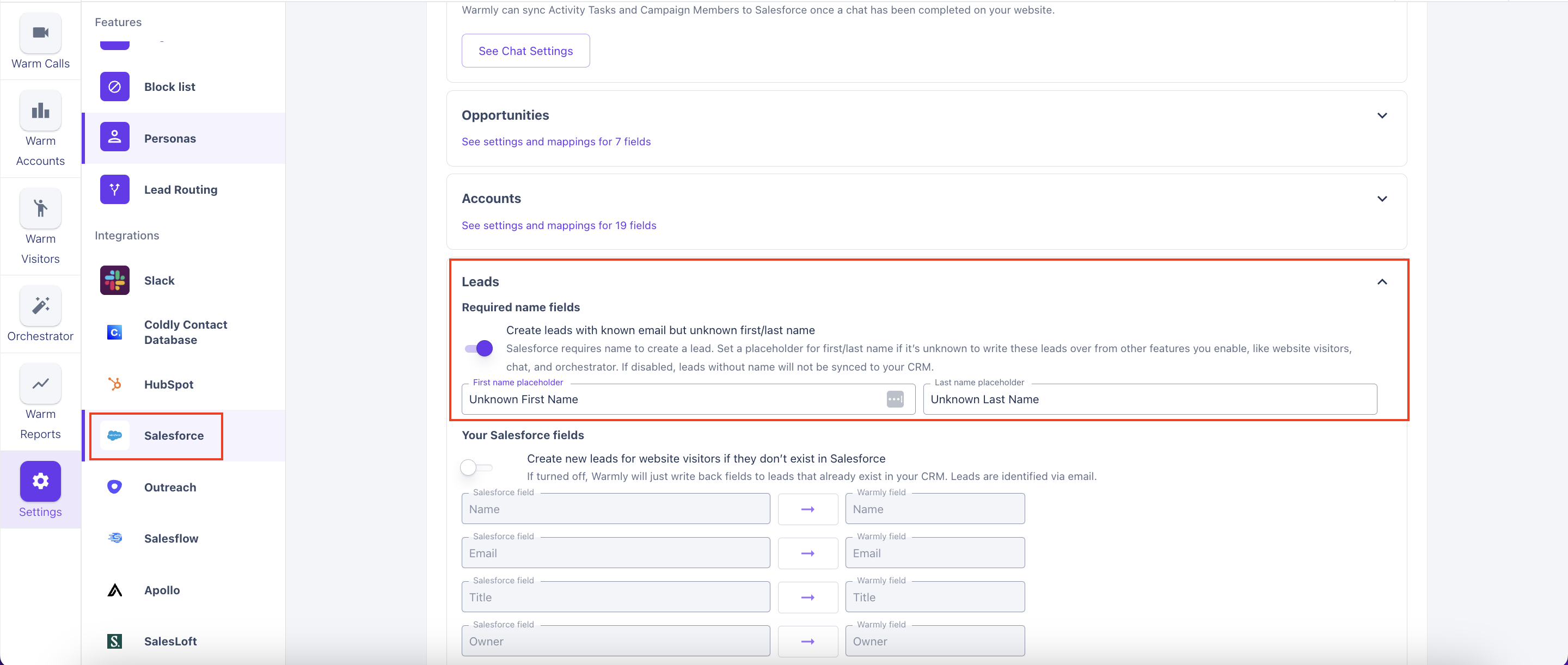
If you set up the placeholder, now SFDC only requires the persons email to push leads into SFDC. Either the person provides their email OR Warmly is able to identify them.
Associated Company for Each Lead
If a Chat occurs for '[email protected]' Warmly recognizes that this person works at 'warmly.ai' through the email domain. A new LEAD record will be created in SFDC using the First Name, Last Name, and Email provided in the chat. However, since there was no company information found by Warmly, the company name did not get pushed to SFDC. It is set to 'Unknown'.
If a Chat occurs under '[email protected]' and Warmly can't find any company info, it's marking it as an unidentified user. Because of that, no information was sent to SFDC. So, no LEAD record was created even though First Name, Last Name, and Email was provided in chat.
TLDR: If Warmly can't find a company name for a user, a new lead record will not be pushed to SFDC, and chat activity will not sync.
Finding Chats in Salesforce
Chat conversations themselves will be synced back to the individual lead record as described above.
Within Chat, you can ask Prospects for their email address as a way to identify who is on your site. Most customers sync Prospect emails back to their Salesforce as you can see below.

How do you find these leads in Salesforce?
If you want to compile a list of all chats that have been gathered via Chat form (above), you can add the filters of "Warm'y created" + "Warmly: Identification Source" equals "Inbound Chat Form" (see below)
This will show you a list of all prospects who have entered their email into the chat form.

This article was written by the Customer Success team at Warmly. Please feel free to reach out to your CSM directly or [email protected]