Warmly Technical Documentation: MCP Server
Last updated: June 17, 2026
Note: Free with every Warmly account: 250 credits/month. Paid tiers from $99.
Warmly's MCP server and REST API are live at opps-api.getwarmly.com. OAuth-based MCP access from Claude Desktop, Claude Code, Cursor, and any MCP-compatible agent — plus REST endpoints with API key auth for everything else. Three read-only tools.
Installation Instructions
Claude Desktop
Open Customize → Connectors
Click the + next to Connectors, then Add custom connector
Name:
Warmly. URL:https://opps-api.getwarmly.com/api/mcp(if your account is in multiple Warmly workspaces, you'll need an orgId — see Specify your organization below)Click Add. A browser tab opens for OAuth. Sign in with your Warmly account
Tools become available in chats automatically
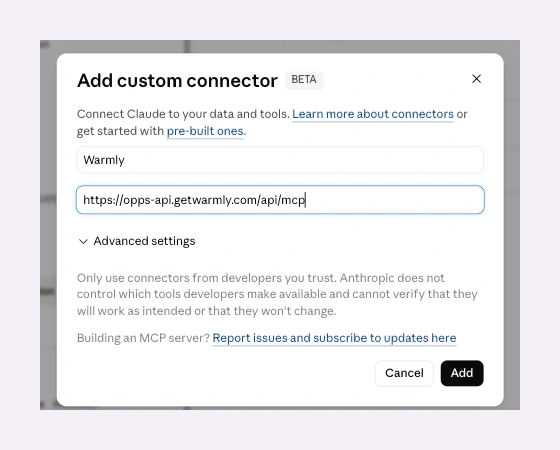
The Add custom connector dialog in Claude Desktop. Name your connector Warmly and paste the MCP endpoint URL.
Claude Code, Cursor, Zed
Install in one line: claude mcp add --transport http warmly https://opps-api.getwarmly.com/api/mcp (multi-org users add --scope user plus a header — see Specify your organization)
First tool call opens a browser for OAuth. After login, /mcp lists the tools. To remove later: claude mcp remove warmly.
Specify your Organization
If your Warmly account belongs to more than one organization, you'll need to tell the MCP which one to use — otherwise you'll see a 401 missing_org_context. This also applies if you're an admin pinning a connector to a specific workspace (common for agencies managing multiple clients). Two ways to do it.
Query string — cleanest for Claude Desktop. Append ?organization_id=<your-org-id> to the MCP URL: https://opps-api.getwarmly.com/api/mcp?organization_id=3d5c193a-bb60-4833-8301-123abc456
Header — cleanest for CLI installs. Pass X-Warmly-Organization-Id on the install command. The --scope user flag makes the connector available across all your projects, not just the current one.
Example: claude mcp add --scope user --transport http warmly-prod https://opps-api.getwarmly.com/api/mcp --header "X-Warmly-Organization-Id: 3d5c193a-bb60-4833-8301-123abc456"
Where to find your orgId. Inside Warmly, open Settings → General — your organization ID is shown there. If you can't find it, email [email protected] and we'll send it over.
The Four Tools Available
1. list_warm_visitors
Identified people who visited your site, with full context. Company profile, contact profile, every page they visited, session time, last seen, UTM source, and whether they exist in your HubSpot, Salesforce, or Pipedrive. Free to call.
Inputs: timeWindow (past_day default, past_week max), take (1-500, default 25), offset, requireBusinessContact (LinkedIn handle + work email only), searchTerm (substring against name/email/company), countries (ISO codes), industries, employeeSizeBands (e.g. 11-50, 51-200, 10000+), pagesVisitedContains.
2. list_warm_accounts
Same data grouped by company. Adds visitor aggregations: total sessions, identified visitors, distinct pages. For when you want the account view instead of the contact view. Free to call.
Inputs: same shape as list_warm_visitors minus the contact-level filters.
3. list_third_party_signals
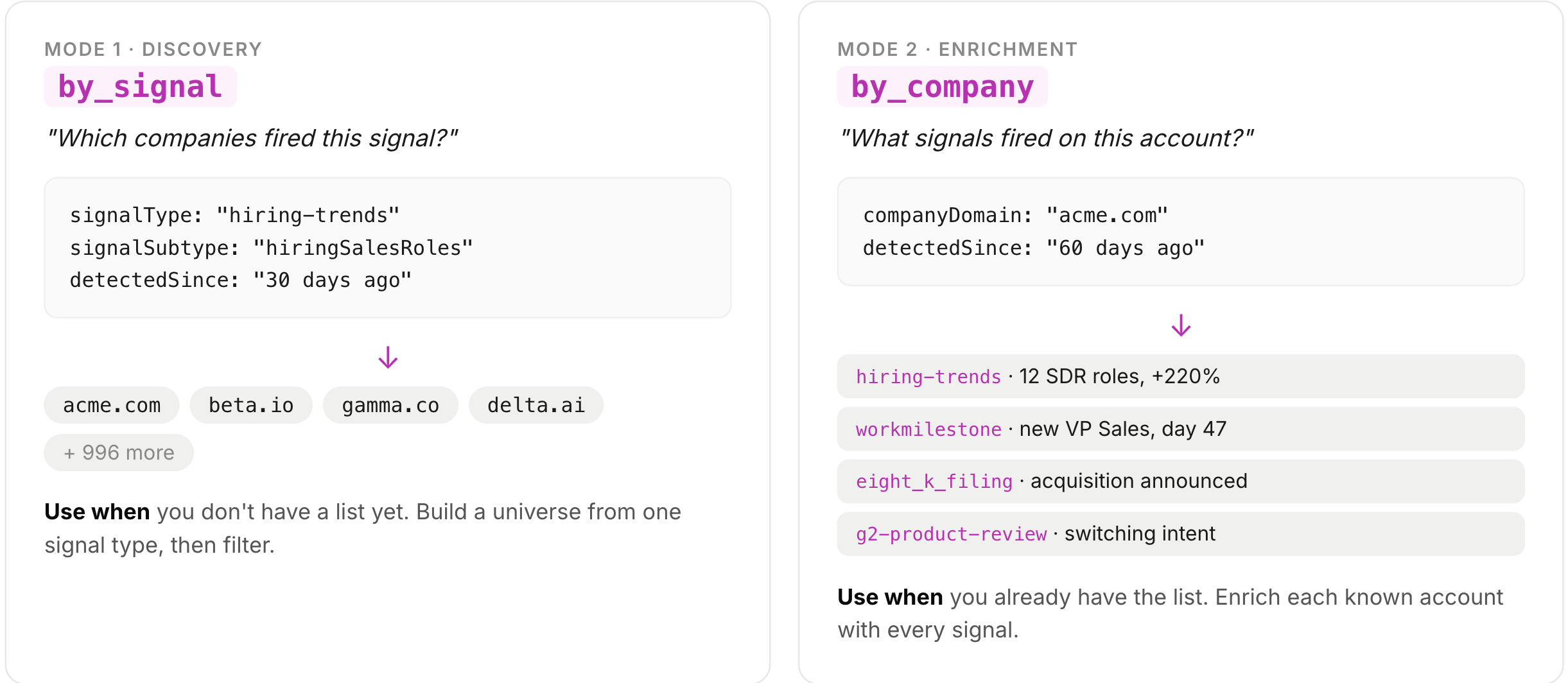
list_third_party_signals is one tool with two modes.
Mode 1: by_signal (the default). "Which companies are showing this signal right now?" Pass a signalCategory, signalType, or signalSubtype and get a flat list of companies (with contacts where they resolve) that fired on that signal in your time window. This is the discovery mode.
Mode 2: by_company. "What signals fired on acme.com recently?" Pass a companyDomain and get every recent signal on that account, collapsed into a single row. This is the enrichment mode.
Three filter levels, broad to narrow. signalCategory (31 buckets like financial, leadership, workforce, buying-intent). signalType (25 events like eight_k_filing, hiring-trends, glassdoor-review). signalSubtype (about 395 in production: jobChange, fundingNews, hiringSalesRoles, acquisition, and so on). Pick the level that matches how specific your query is.
Full catalog of types and subtypes is in The Full Signal Catalog below.
Use exact names from the catalog. Claude will hallucinate plausible-sounding signal names from higher-level intent — it will ask for executiveChange (not a real subtype) instead of ceoChange, cfoChange, cooChange; or fundingNews instead of debtRefinancing, capexIncrease. Either reference the full catalog below, or drop to the broader signalCategory level and let the MCP fan out. If a query returns zero, the most likely cause is a hallucinated subtype, not missing data.
4. get_credits_remaining
Snapshot of your workspace's credit balance for the current monthly window. Lets your agent check before launching a big query and warn you when you're getting close to the limit. Free to call. Takes no inputs.
What You Get Back
Every list_warm_visitors result is a visitor object. Each one includes:
Visitor basics — lastSeen timestamp, totalSessions, sessionTime, page-visit array with paths and counts, UTM params.
Company profile — name, domain, industry, sub-industry, employee range, estimated annual revenue, city, state, country, LinkedIn handle.
Contact profile — fullName, employment_title, employment_seniority, LinkedIn handle, and a bio when available.
Email and phone — work email is included when identified; phone number reveal is coming soon.
CRM intersection —
crmProvidersarray tells you whether the visitor already exists in your HubSpot, Salesforce, or Pipedrive.
That last one is the dedupe story. About half of identified visitors are already known to someone on your team. The MCP tells you which ones are net-new.
Two Flows, One Pattern
Preview first, then commit. preview: true never charges a credit. It returns the total count so you (or your agent) can decide whether the spend is worth it before running it for real.
Flow 1: "Give me the best 1,000 ICP companies with signals"
You don't have a list yet. You want every in-market account showing a signal you care about. ICP filter on top.
list_third_party_signals(
  mode: "by_signal",
  signalCategories: ["workforce", "leadership", "financial", "strategic"],
  detectedSince: "2026-05-15",
  take: 500,
  preview: true
)
// returns total: 4,200 - your potential universe
Then pull 500 at a time with offset. Each row costs 1 credit per new company plus 1 per new contact, where new means "first time you've pulled them this calendar month."
Flow 2: "Here are 200 accounts, enrich them"
You already have the list (CRM export, ABM list, last quarter's closed-lost pile). You want to know which of them are warm right now.
for domain in account_list:
  list_third_party_signals(
    mode: "by_company",
    companyDomain: domain,
    detectedSince: "2026-03-15",
    preview: true
  )
// say 60 of 200 domains return signals
// only pull rows for those 60
// cost: 60 company credits worst case, often less
Library card, not meter. Once you've paid for Acme this month, every other row returning Acme is free. Run the same query the next morning, you pay nothing. You're paying for the accounts and contacts you've unlocked, not the API calls you make.
Filter after, not before. The MCP doesn't support server-side ICP filters on list_third_party_signals yet — you can't pass industry: SaaS, employees: 200-2000 as a filter on the query. The workflow is: pull a signal-matched company set, then filter to ICP in the agent's next step. The library-card model makes this cheap on the re-pull, but it does mean your first query for a signal type returns the broad universe. If you have a tight ICP, start with Flow 2 (enrich a known account list) instead.
Server-side filters land next. country and employee_size filters on list_third_party_signals are shipping in the next release — bringing it to parity with list_warm_visitors and list_warm_accounts, which already accept those filters. Once shipped, the recommended pattern flips: filter to ICP then commit credits, so you preview a 1,000-row result with country: ["US", "CA"] and employee_size: "200-2000" already applied, then pull only what fits your ICP.
Troubleshooting
Browser doesn't open for OAuth — Popup blocker or stale session. Re-run
claude mcp addor re-add the connector in Desktop.401 unauthorized— MCP token expired or revoked, or REST API key invalid. For MCP: remove and re-add the connector. For REST: regenerate the key in the admin UI.401 missing_org_context— No org could be resolved (admin passed a bad header, or user has multiple memberships and no header). For MCP, pass?organization_id=<uuid>in the URL orX-Warmly-Organization-Idas a header. For REST, passorganizationIdin the body.403on REST calls — TheorganizationIdyou sent doesn't match the API key's org. Use the org the key was issued for, or generate a new key for that org.Tools missing from
/mcplist — Connector not authenticated yet, or filter rejected an async/write tool. Confirm OAuth completed; the server only exposes read-only sync tools by design.HTTP 429rate limit — Hit the per-minute call limit (60 free, 120 paid). Back off about 60 seconds and retry; reduce batch size on next call.Over-charge gate fired. Drop
take, narrow filters, or upgrade.creditsConsumed: 0but rows came back. Eitherpreview: trueis set, or every row was already paid for earlier this month. Both expected.Empty result, no hint. Your filters genuinely matched zero. Loosen
signalSubtypetosignalCategory, or widendetectedSince.Empty result with
narrowQueryHint. Query is too broad and got capped attake. AdddetectedSince,signalSubtype, orsignalType.
Pricing
API/MCP self-serve tiers ladder up by credit volume. All tiers include the same three tools, OAuth-based MCP access, and REST API access via key. Commit to a quarter or a year via sales for a better unit rate.
Tier | Price | Credits/mo | $/credit | Annual |
|---|---|---|---|---|
Free | $0 | 250 | — | $0 |
Starter | $99/mo | 500 | $0.198 | $1,188 |
Growth Popular | $199/mo | 1,000 | $0.199 | $2,388 |
Pro | $499/mo | 2,500 | $0.200 | $5,988 |
Enterprise | Talk to sales | 2,500+ | — | Custom |
Need more than 2,500 credits/mo? Talk to sales. Enterprise adds Inbound and Outbound Agents, AI Studio, retargeting, premium identification, multi-CRM bidirectional sync, dedicated AM, and SLA — plus a better unit rate on quarterly or annual commitments.
Have questions or feedback? Reach out to your CSM or email us at [email protected]