Setup Guide: ActiveCampaign Enrichment Integration
Last updated: May 5, 2026
Connect Warmly to ActiveCampaign to automatically enrich your contacts with professional and firmographic data. When a contact is added or updated in ActiveCampaign, Warmly enriches the contact record with person and company data and writes it back to custom fields on the contact.
What You'll Need
A Warmly account
An ActiveCampaign account with API access
Your ActiveCampaign API URL and API Key (found under Settings > Developer in ActiveCampaign)
Step 1: Navigate to Integrations in Warmly
Log in to your Warmly account at https://opps.getwarmly.com/
Go to Settings from the left sidebar.
In the Integrations section, select ActiveCampaign.
Step 2: Find Your ActiveCampaign API Credentials
You'll need two pieces of information from your ActiveCampaign account:
Log in to your ActiveCampaign account.
Navigate to Settings > Developer.
Copy your API URL (e.g.,
https://youraccountname.api-us1.com).Copy your API Key.
Tip: Keep this tab open — you'll paste these values into Warmly in the next step.
Step 3: Connect ActiveCampaign to Warmly
Back in Warmly's ActiveCampaign integration page, paste your API URL into the API URL field.
Paste your API Key into the API Key field.
Click Test to verify the connection.
Once you see the "Connected" confirmation, you're all set.
Warmly automatically configures everything behind the scenes:
A "Warmly Enrichments" webhook is created in your ActiveCampaign account.
The webhook is set to listen for Contact Added and Contact Updated events across All Lists.
Warmly-prefixed custom fields are provisioned on your contact records.
Note: You don't need to manually configure any webhooks or custom fields — Warmly handles this automatically when you connect.
Step 4: Verify the Setup in ActiveCampaign (Optional)
If you'd like to confirm that the integration is configured correctly:
In ActiveCampaign, go to Settings > Developer.
You should see a new webhook named "Warmly Enrichments" with the following settings:
List: All Lists
Events: Contact Added, Contact Updated
Initialize From (Source): By a contact, By any user, By system processes
How Enrichment Works
Once connected, Warmly enriches contacts automatically:
A contact is added or updated in ActiveCampaign (manually, via import, form submission, or automation).
ActiveCampaign sends the contact data to Warmly via webhook.
Warmly enriches the contact using its data engine.
Enriched data is written back to your ActiveCampaign contact record as custom fields.
Enrichment typically completes within a few seconds of the contact being added or updated.
Enrichment Fields
Warmly adds the following custom fields to your ActiveCampaign contacts, all prefixed with Warmly_:
Person Data
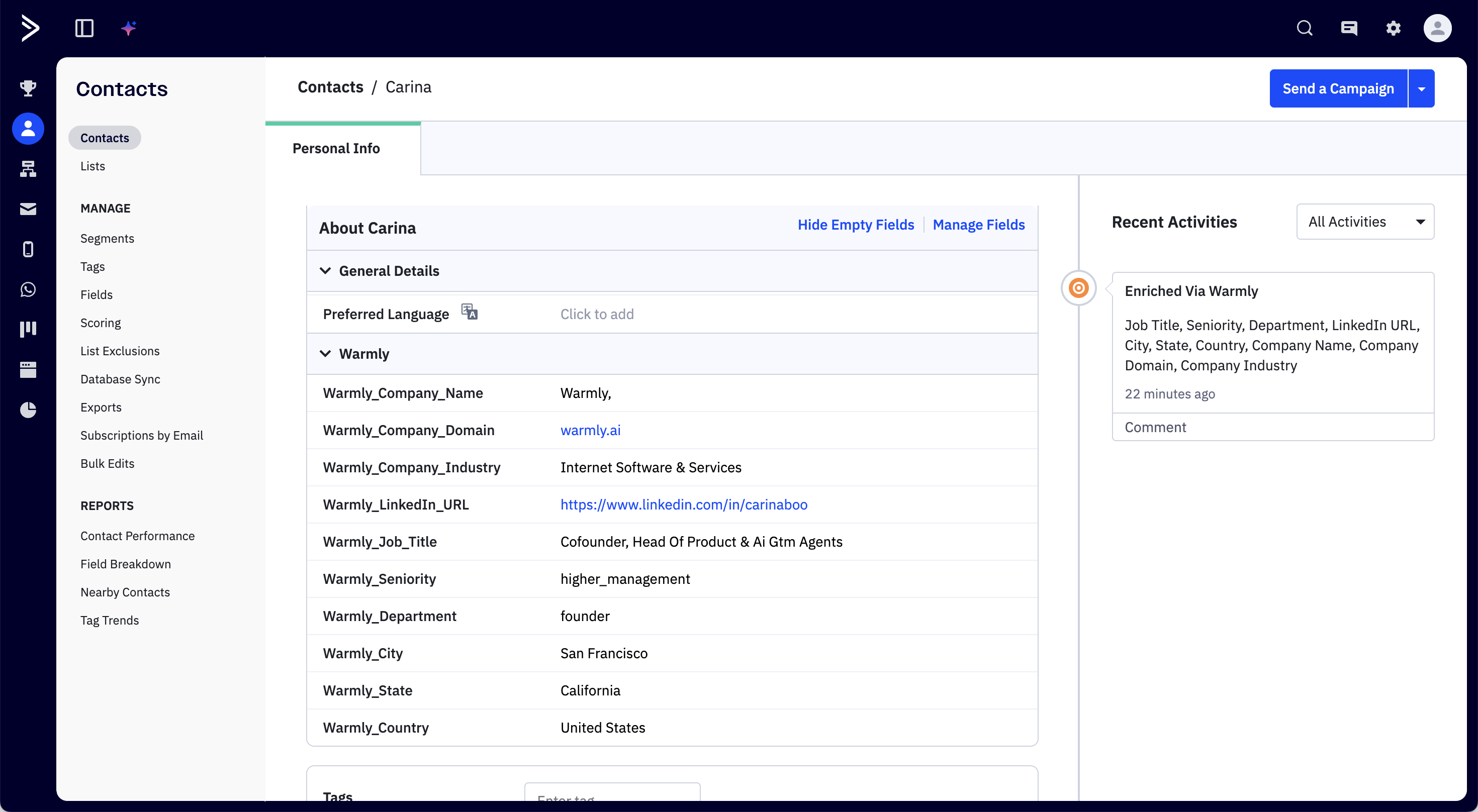
Field NameDescription | |
Warmly_Job_Title | Current job title (e.g., "Co-founder, CPO") |
Warmly_Seniority | Seniority level (e.g., executive, manager, director) |
Warmly_Department | Department (e.g., Engineering, Sales, Marketing) |
Warmly_LinkedIn_URL | LinkedIn profile URL |
Warmly_City | Person's city |
Warmly_State | Person's state or region |
Warmly_Country | Person's country |
Company Data
Field NameDescription | |
Warmly_Company_Name | Employer name |
Warmly_Company_Domain | Company website domain |
Warmly_Company_Industry | Industry classification (e.g., "Internet Software & Services") |
These fields appear as columns on your Contacts list in ActiveCampaign and can be used in segments, automations, and reporting.
Field Visibility
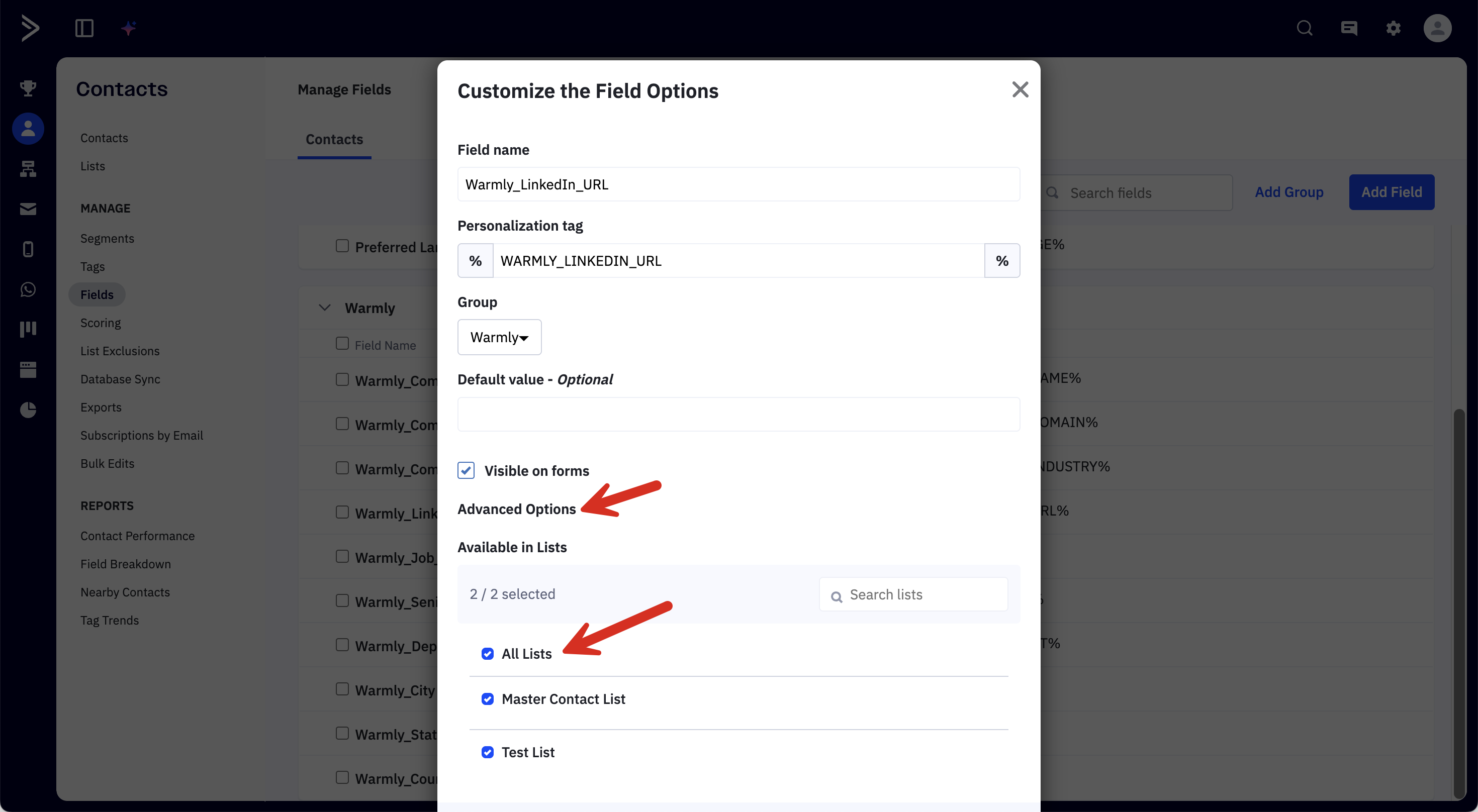
If you'd like the Warmly fields to be visible in your Contact page, make sure to add the field into a group, and in Advanced Options, select "All Lists" for visibility.
Frequently Asked Questions
Which contacts get enriched?
All contacts that are added or updated across all of your ActiveCampaign lists are automatically enriched. This includes contacts added manually, via import, through forms, or by automations.
How long does enrichment take?
Enrichment typically completes in under a minute of the contact creation event.
Will Warmly overwrite my existing contact data?
No. Warmly writes only to its own Warmly_-prefixed custom fields. Your existing ActiveCampaign contact fields (name, email, phone, tags, etc.) are never modified.
What if a contact doesn't have enrichment data?
If Warmly doesn't have data for a particular contact or field, those custom fields will simply remain empty. Contacts with a valid business email address have the highest enrichment rates.
Can I customize which fields are enriched?
The current version enriches all available fields listed above. Custom field selection will be available in a future release.
How do I disconnect the integration?
Navigate to Settings > Integrations > ActiveCampaign in Warmly and click Disconnect. This will remove the Warmly webhook from your ActiveCampaign account. The Warmly_ custom fields and any previously enriched data will remain on your contacts.
Troubleshooting
"Connection failed" when testing credentials
Double-check that you copied the full API URL (including
https://).Verify your API Key is correct — you can regenerate it under ActiveCampaign Settings > Developer if needed.
Ensure your ActiveCampaign account has API access enabled.
Contacts aren't being enriched
Confirm the integration shows as Connected in Warmly Settings.
In ActiveCampaign, verify the "Warmly Enrichments" webhook exists under Settings > Developer and is active.
Check that the webhook events include Contact Added and Contact Updated.
Try adding a new test contact with a valid business email address and check if the
Warmly_fields populate after a few seconds.
Some fields are empty after enrichment
This is normal. Warmly enriches with the data available in its data engine. Not all contacts will have every field populated, especially contacts with personal email addresses (Gmail, Yahoo, etc.). Business email addresses yield the best enrichment results.
Need help?
If you're running into issues with the ActiveCampaign integration, reach out to us:
Email: [email protected]
Chat: Use the chat widget on warmly.ai