Warmly Implementation Documentation: Meta Ads
Last updated: May 6, 2026
Note: This is only available on paid Warmly plans, it is not available to Freemium users.
Warmly's Meta Ads integration lets you automatically add identified website visitors to your Meta Custom Audiences — enabling you to retarget them on Facebook and Instagram as part of your pipeline workflow.
How It Works
Once connected, you can use Meta Ads as an action step inside a Warmly orchestration workflow. When a visitor matches your workflow's criteria, Warmly adds their hashed email and phone number to the selected Custom Audience in your Meta Ads account.
Connecting the Integration
In Warmly, go to Settings → Integrations
Find Meta Ads and click Connect
Complete the Facebook OAuth flow — grant Warmly access to manage your Custom Audiences
Warmly will display the ad accounts associated with your login
Required permissions: During the OAuth flow, ensure you grant permission to manage Custom Audiences. Without this, Warmly won't be able to add members to your audiences.
Setting Up an Audience Action in a Workflow
Meta Ads works with existing Custom Audiences in your Meta Ads account. You'll need to create the audience in Meta first, then reference it in Warmly:
In Meta Ads Manager, create a Customer List Custom Audience
In Warmly, open or create a workflow in Orchestration
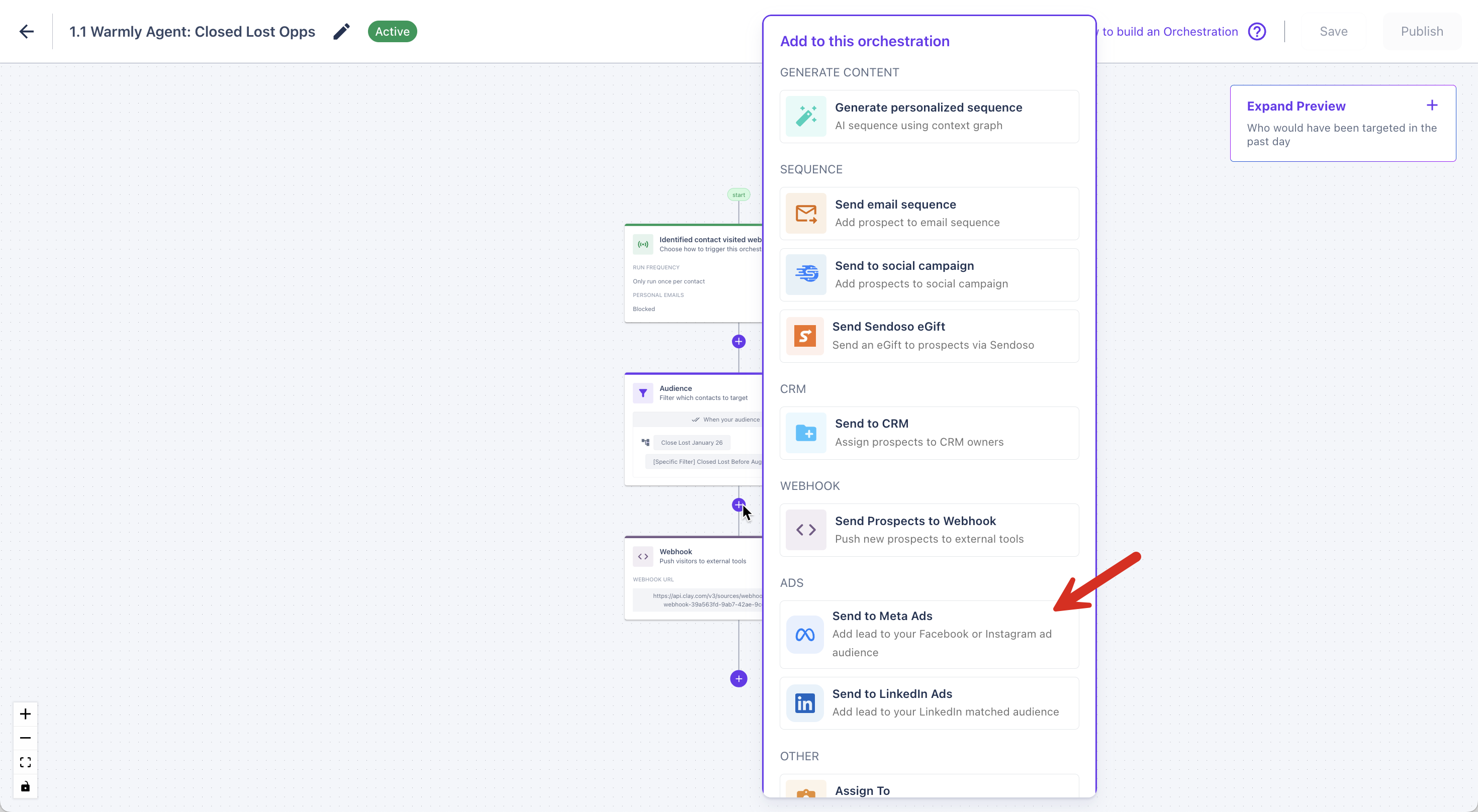
Add a new action step and select Meta Ads
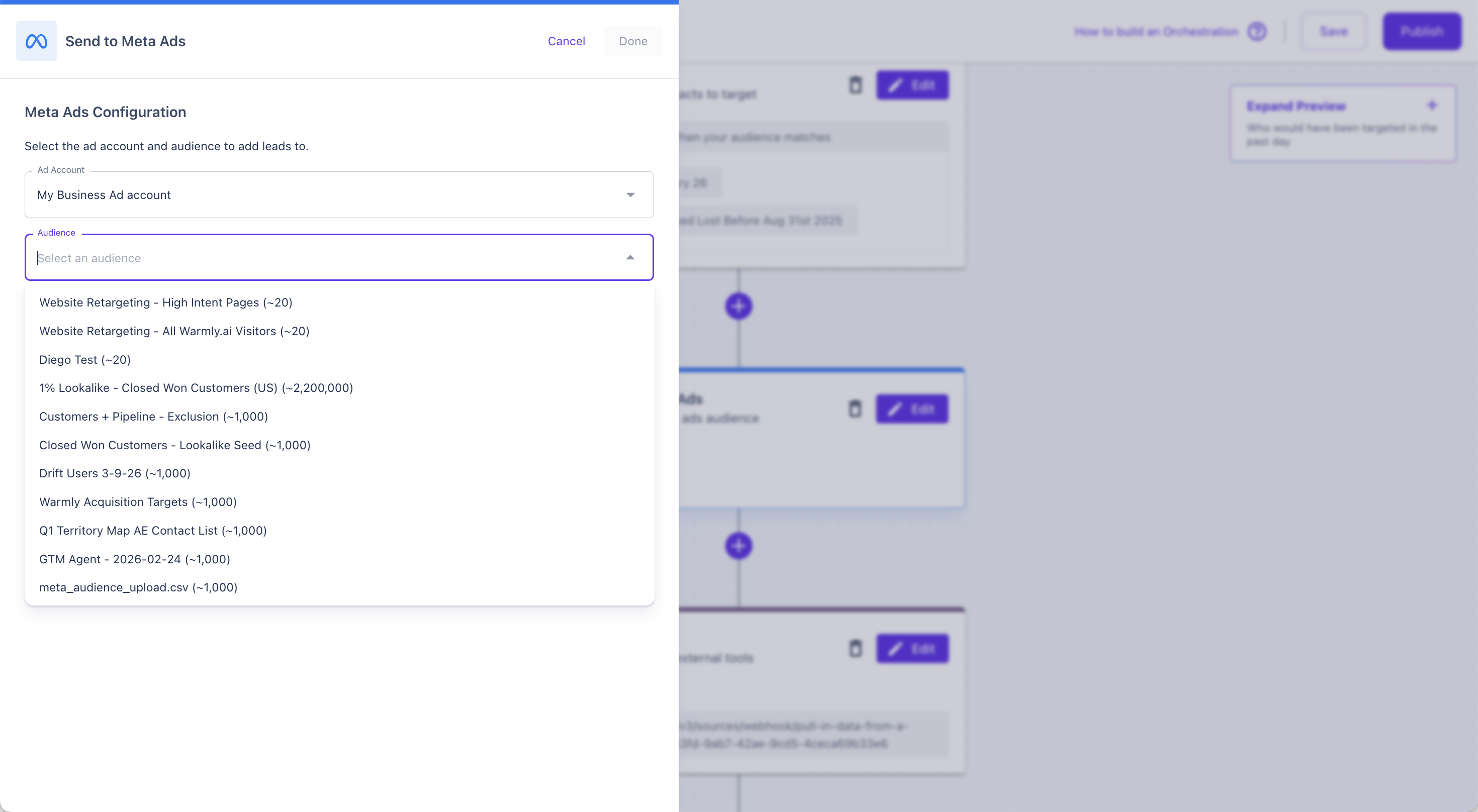
Choose the Ad Account and then the Custom Audience you want to add visitors to
Save and activate the workflow
When a visitor triggers the workflow, Warmly automatically adds their contact data to the selected audience.
And from Meta, you can run add that Custom Audience to your Ads Campaign for retargeting.
What Data Warmly Sends
Warmly sends hashed contact fields to Meta based on what's available for the identified visitor:
Field | When Sent |
|---|---|
When an email is known for the visitor | |
Phone number | When a phone number is available |
Emails are lowercased
Phone numbers are normalized to E.164 format (e.g.
+15551234567)
If neither email nor phone is available for a visitor, Warmly skips that step run — no record is sent.
Frequently Asked Questions
Do I need to create the Custom Audience in Meta first? Yes. Warmly adds members to existing Custom Audiences — it doesn't create new ones. Create a Customer List Custom Audience in Meta Ads Manager first, then select it in your Warmly workflow.
What type of Custom Audience should I use in Meta? Use a Customer List Custom Audience (also called a "file-based" audience). Warmly adds contacts directly to this list via the Meta API.
How long does it take for audiences to become active in Meta? Meta typically processes uploaded audiences within 24–48 hours. Audience size estimates in Meta Ads Manager may take up to 72 hours to update.
Can I use the same audience in multiple Warmly workflows? Yes. Multiple workflows can target the same Custom Audience — Warmly appends members from each workflow independently.
What if my Meta token expires? Warmly detects expired tokens automatically and attempts a token refresh. If the refresh fails, syncing will pause and you'll need to reconnect via Settings → Integrations → Meta Ads.
Are there limits on how many contacts Warmly can add? Meta accepts up to 10,000 records per API call. Warmly batches uploads automatically if a single workflow run produces more than that, so you don't need to worry about this in practice.